
The journal
Ideas, notes
& useful things.
Browse by topic
- AI & Automation (4)
- Business & Industry (22)
- Content & Copywriting (12)
- Digital Marketing (23)
- Graphic Design & Creative Tools (5)
- Hosting & Maintenance (9)
- Matterport & Property Media (9)
- Microsoft 365 & Email (23)
- Online Safety & Scams (7)
- SEO & AI Search (20)
- Seven Creative News (9)
- Technology & Practical Guides (18)
- Websites & WordPress (12)
-
How to create an outlook email template
How to create an outlook email template If you use Outlook and often have to write similar emails, Instead of re-writing them every time it might be a better idea to create a template. This is very simple to do and might save you a lot of time! Here’s how to do it: Write your…
-
Instructions about how to back up and export webmail emails from Horde
Instructions about how to back up and export webmail emails from Horde If you’re using Horde to manage your webmail emails and want to back them up, you may have realised that it seems to be not as easy to do as you’d hope without going through and forwarding email groups individually Fortunately, it is…
-
Phishing emails – tell-tale signs it’s not from who it says it’s from
I’ve just received quite an ingenious phishing email… well it’s slightly more intelligently conceived and implemented than the usual type Yesterday I made an order on Amazon and today I get an email, pertaining to be from Amazon, telling me that my order has been cancelled! Firstly, even though I’m sure that me receiving an…
-
Take another look at the Amazon Kindle
If you’re anything like me you’ve probably always dismissed the idea of the Amazon Kindle before looking into it in any real detail. I have, however, looked into it in a bit more detail recently and am very impressed by the spec! The following might just sway you too: Here are the other technical specifications…
-
News and offers for friends of Seven Creative (7th September 2010)
A party invitation, my prediction and a special offer… Sheffield Cathedral Launch party – Monday 20th September Here at Seven Creative Towers we’re busily beavering away like busy beavering bees to get the new Sheffield Cathedral suite of websites up and running in time for the launch event on Monday the 20th September As friends…
-
Great news for friends and customers of Seven Creative!
Great news for friends and customers of Seven Creative! Chris Seaman of Seaman Photographers, Sheffield, is offering friends of Seven Creative a great social networking and business photography package which will provide you with a professional studio quality portrait to use on your social networking pages such as LinkedIn, Twitter and Facebook Give him a…
-
Kenneth Hudson Interiors – Business profile and testimonial
About Kenneth Hudson Interiors Kenneth lives just outside Milton Keynes on the borders of Buckinghamshire and South Northamptonshire with his wife Sarah and two daughters, Gracie and Eliza. Kenneth Hudson Interiors was founded in 2000. Prior to this, Kenneth worked for 18 years in and around London on many residential refurbishments. In 2010, Kenneth Hudson…
-
Janet Wass’ – Business profile and testimonial
About Janet Wass Based in Sheffield, Janet Wass designs and creates simple, elegant jewellery for the contemporary individual. She fuses her passion for jewellery with her love of photography, lacing her designs with photographically produced imagery using laser-cutting and photo-etching alongside traditional jewellery making techniques. Jewellery is designed to be comfortable and wearable. It’s elegant…
-
The importance of having a website
Introduction I was recently commissioned by the Chamber of Commerce to write a short article about the ‘importance of having a website for small businesses’. When I looked at the ‘subject’ around which to write an article, I have to say I was a little stumped. The problem is that I just don’t agree with…
-
How to create a screen-capture of a web page in Windows
A screenshot is often the simplest way to show a website problem. On current Windows versions you can capture the relevant area without installing a browser extension. Capture the part you need Press Windows + Shift + S to open the screen-capture controls. Choose a rectangular area, a window or the full screen. Drag over…
-
Convert text to lower-case, upper-case or capitalised the easy way!
This tutorial is specifically for Microsoft Word and Outlook, however, as with many keyboard shortcuts, they’ll often be supported by many other applications Ever accidentally hit the CAPS LOCK button and written a whole paragraph in capitals? Or how about got one of those shouty emails all in caps that are difficult to read? Good…
-
What is a webloc file or the .webloc file extension?
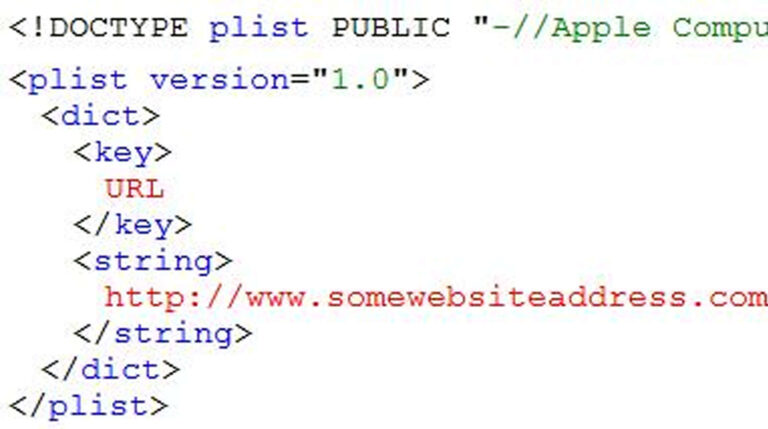
What is a WEBLOC File? A .webloc file is a website shortcut created by macOS. It works exactly like a standard desktop application shortcut, but it points to a specific webpage on the internet rather than a local program. How they are created You generate these files on a Mac by dragging a website address…
-
Sales and marketing optimisation
Consider the alternatives According to IAB (2010), in the UK, the entire advertising sector contracted by 16.6% in the first half of 2009, however, the online advertising share grew by 4.6% to a record 23.5% share of the market. Obviously, in the midst of a recession, you’d expect advertising spend to decline, however, it seems…
-
Protecting your online store
Owning an internet shop or accepting money for goods or services is common practice these days for many website owners; however, as we’re all aware, criminals are forever finding new ways to defraud business owners. An example of a common scam is where a fraudster, posing as a customer, asks to have an item shipped…
-
Windows keyboard short-cuts everyone should know!
There are hundreds of short-cut keyboard combinations and when you start to learn them , they can really help you save a lot of time! Many of them are also transferable meaning, for example, some that work with MS Word may also work with Photoshop. Below are shortcuts that can be useful in Windows desktop…