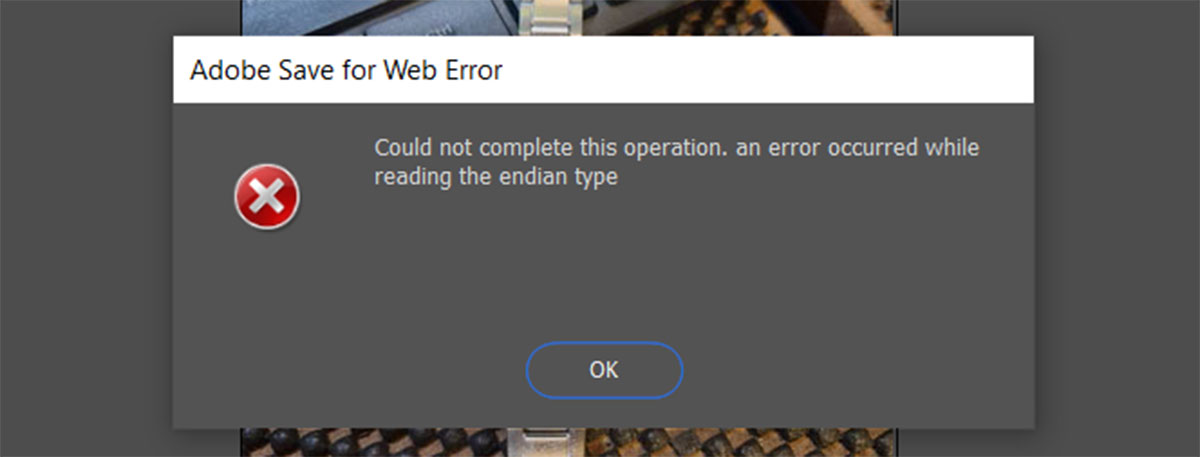
Could not complete this operation, an error occurred while reading the endian type

Photoshop error – Could not complete this operation. An error occurred while reading the endian type

WebP is a modern digital image format developed by Google that offers significant advantages over traditional formats like JPEG and PNG. However, editing and saving this new type of image in Photoshop isn’t always as fast or straight-forward as you’d hope. Problem 1 – Photoshop doesn’t natively support WebP files Versions of Photoshop prior to … Continue Reading

What is a URL shortener and should I use one?

What is a shortened link? A URL link shortner is a way of shortening or disguising a link. They’re normally used to create a shorter version of a very long link but can also be used to track click-throughs or often to disguise a link (commonly for nefarious purposes!). What does a shortened link look … Continue Reading

How do I change my Outlook email account to use SSL?

SSL is an encryption method for sending emails and will help avoid the emails you send being seen by unintended recipients. It stands for Secure Socket Layer and this quick tutorial will show you how to configure Outlook to send using the SSL method. The example below uses Outlook 2007, however, this will still apply … Continue Reading

Updating your password in Outlook 2010 tutorial

It is very simple to update your email collection (POP3) password in Outlook 2010 by following the steps below: Open Outlook Click on the ‘File’ option at the top of the page you’ll now have an option for ‘account settings’ – click here click on the account you’d like to change then select ‘change’ from … Continue Reading

How to use Gmail as your SMTP server using Outlook

This tutorial will show you how to use your Gmail SMTP address to send emails from your personal email accounts using Outlook (this example uses Outlook 2007 but still applies in principle to the other versions of Outlook and other local email clients)

How to Add Users to your Google Analytics Account

If you want someone else to be able to view or use your Analytics account then you should carry out the steps below: 1. Log in to your analytics account at google.com/analytics 2. Go to your account dashboard or the dashboard for the domain you want to share access to 3. Click on “Admin” at … Continue Reading