
Microsoft Outlook
Browse other topics
- AI & Automation (4)
- Business & Industry (22)
- Content & Copywriting (12)
- Digital Marketing (23)
- Graphic Design & Creative Tools (5)
- Hosting & Maintenance (9)
- Matterport & Property Media (9)
- Microsoft 365 & Email (23)
- Online Safety & Scams (7)
- SEO & AI Search (20)
- Seven Creative News (9)
- Technology & Practical Guides (18)
- Websites & WordPress (12)
-
How to add Microsoft Exchange to your mobile devices
Android mobile phone or tablet iPhone or iPad Adding Microsoft Exchange to your mobile device generally involves a few key steps… …regardless of whether you’re using an iPhone, Android, or another smartphone. The primary goal is to configure your device’s mail application to connect to your Exchange server. On most devices you’ll typically start by…
-

How to change the default browser in Outlook
When you click a link in an email using Windows Outlook (desktop app), by default it opens in a browser window. My default browser was highjacked again by Edge. But I don’t want to use Edge for these links or any others. So I changed the default Outlook browser back to my usual browser. This…
-
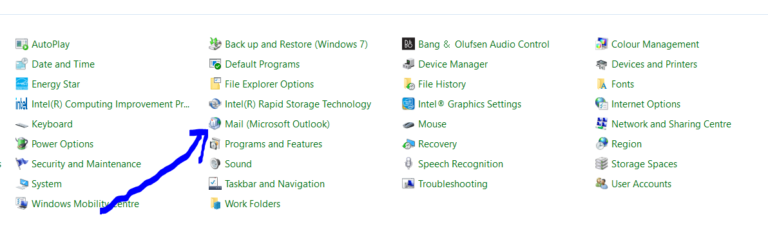
How to remove an IMAP or POP3 account from Outlook 365 (Windows)
1. Open up control panel The fastest way is to normally press the ‘Window’ key (for search) they type in ‘control panel’ 2. Click on ‘Mail’ options 3. Click on ‘Email accounts’ 4. Click on the account you’d like to delete then click the ‘remove’ option 5. Close ‘mail options’, ‘control panel’ and ‘Outlook’ then…
-
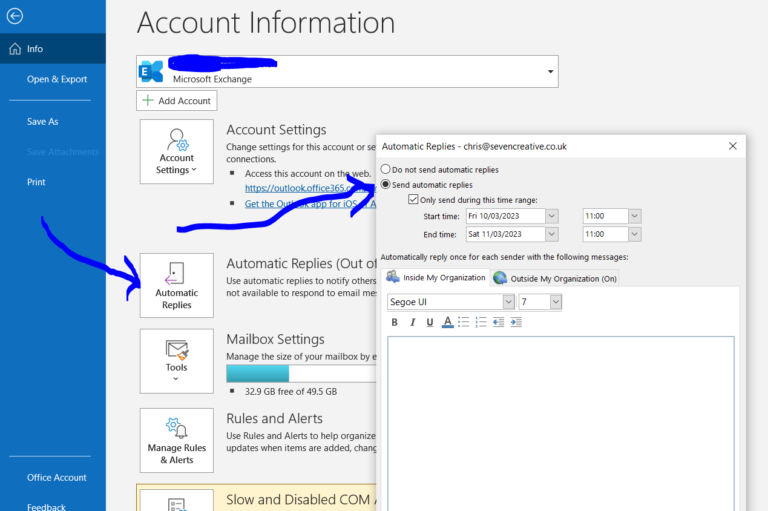
How to send out of office replies with the Outlook 365 desktop app (3-step tutorial)
1. Click on ‘File’ in the top-left corner 2. Click on ‘Automatic replies’ 3. Set your reply and when you want it to send That’s it! Out-of-office replies if you use Microsoft Outlook.com – tutorial you can also set up out-of-office replies if you use Microsoft Outlook.com – otherwise known as ‘Outlook on the Web’.…
-
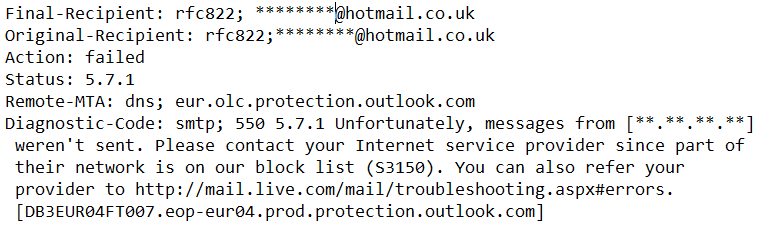
Unable to send email to Hotmail or Outlook addresses – how to remove yourself from the Hotmail block-list
If mail to an Outlook.com or Hotmail address is rejected, keep the full non-delivery report. The exact error, sending IP and sending service matter; “Microsoft blocked us” is not enough to choose a remedy. Identify the actual rejection Record the SMTP code, affected recipients and when it started. Keep private message content out of public…
-
Microsoft Outlook email signature locations
Outlook signatures are not stored in one universal place. First identify whether you use classic Outlook for Windows, new Outlook or Outlook on the web. Copying a Windows folder is not a reliable way to move signatures between all of them. Classic Outlook for Windows For local signature files, open File Explorer, enter %APPDATA%\Microsoft\Signatures in…
-
Updating your password in Outlook 2010 tutorial
It is very simple to update your email collection (POP3) password in Outlook 2010 by following the steps below: Open Outlook Click on the ‘File’ option at the top of the page you’ll now have an option for ‘account settings’ – click here click on the account you’d like to change then select ‘change’ from…
-
Outlook – certificate security warning
If Outlook warns that a server certificate cannot be verified, do not solve the warning by turning encryption off or accepting an unknown certificate. The warning deserves investigation. Record the problem Note the exact message, the account affected and whether sending or receiving fails. Do not publish your login details. Check that you are on…
-
Updating your email password and security settings on Outlook 2007
Here is a short tutorial on how to update your email password and change the connection to the SSL security type. Note: this tutorial relates to email collection (POP3 or IMAP) not email sending (SMTP) and email collection connection security only. Updating the email collection security type to SSL Step 1 – open Outlook and select…
-
How to use Gmail as your SMTP server using Outlook
This tutorial will show you how to use your Gmail SMTP address to send emails from your personal email accounts using Outlook (this example uses Outlook 2007 but still applies in principle to the other versions of Outlook and other local email clients)
-
Outlook 2007 – adding SMTP authentication
When using a laptop or mobile device, you’re potentially going to be sending emails over many different internet networks. In order to make sure that only the allowed users are using a particular SMTP to send email, they commonly require a user-name and password to log into the SMTP server every time an email is…
-
How to create an outlook email template
How to create an outlook email template If you use Outlook and often have to write similar emails, Instead of re-writing them every time it might be a better idea to create a template. This is very simple to do and might save you a lot of time! Here’s how to do it: Write your…